The Vector
For the person who wants to read a model card and a filename.
Two words before the first filename. A model card is the page a maker publishes beside the files, saying what they are and how they were made; 2.13 reads one in order. A vector, in this trade, is a list of numbers standing for one thing; every token becomes one inside the file, and 2.12 places the word. The tier is named for it because from here on you read the numbers rather than the words.
What does Qwen3.8-27B-UD-Q4_K_M.gguf actually say?
On the day this guide was checked, the most-downloaded copy of the Origin tier's model was a quantised one, with each number stored in fewer bits (2.8 explains how): a 16.46 GB file called Qwen3.8-27B-UD-Q4_K_M.gguf, published not by Qwen Alibaba but by a third party called Unsloth, from a folder that on that day showed downloads in the millions.
Read it left to right. Qwen is the family, the name Alibaba gives its openly downloadable models. 3.8 is the generation; it follows 3.5 and 3.6, and the number means "this architecture, this training run", not a decimal version of anything. 27B is the size: 27 billion parameters. UD is a tag the publisher adds for its own quantisation recipe; it is not part of any standard and another publisher's file would not carry it. Q4_K_M is the precision: a 4-bit quantisation, in one particular scheme. .gguf is the file format, which decides which programs can open it.
Same word, different thing: family. In the map at 1.5 a family is a pairing of an input and an output, which is what sorts the whole subject into rows and columns. In a filename it is the maker's series: Qwen, Gemma, Llama Meta. The first is a kind of job; the second is a brand. Both are called a family and nothing marks which is meant except what is around it.
Six parts, and every one of them is a section below. By the end of this tier you should be able to read any filename on a model hub the same way; Hugging Face is the one this guide uses (2.13).
Fragments you will meet in names and tables. Six parts cover this filename. Other makers add pieces of their own, and the tables in the Nexus tier print names as they come, so here is what the extra pieces mean. A four-digit stamp is a date or a version: Qwen calls Qwen-Image-2512 its December update, and Mistral's own model list gives Mistral-Small-4-119B-2603 as v26.03, so read year then month; DeepSeek-V4-Pro-0813 has the same shape, and its card does not say what the digits stand for.
patch16means the vision encoder cuts an image into patches sixteen pixels square.so400mis a shape-optimised vision transformer of about 400 million parameters.hierais the name of a hierarchical vision transformer, not an abbreviation to expand.TDTis Token-and-Duration Transducer, a speech architecture that predicts each token together with how many frames of sound it covers.12Hznames the low-rate speech tokenizer variant, which Qwen's own table lists at 12.5 frames per second. Three parts of a parameter count in the Nexus table are makers' own additions. Qwen's n-gram embedding is an extra lookup component indexed by short runs of tokens, which Qwen says needs less computation and offloads more easily than experts (2.6). DeepSeek's Engram memory is 196 billion parameters its card calls conditional memory, sparsely accessed by token lookup, and the same card's two active counts are one for prefill and one for decode (2.2). Gemma's Google DeepMind "effective" count leaves out its per-layer embedding tables; the total with them is larger.
- QwenfamilyAlibaba's series
- 3.8generationfollows 3.5 and 3.6, not a decimal version of anything
- 27Bsize27 billion parameters
- UDpublisher's tagits own quantisation recipe, part of no standard
- Q4_K_Mprecision4-bit quantisation, in one particular scheme
- .ggufformatdecides which programs can open it
What is inference, and why are there two speeds and a count?
The Qwen3.8-27B card says its training stage is "Pre-training & Post-training". Both are finished. Most of what you will do with the finished file is the other thing: inference.
Inference, the word 1.7 gave you, is running the model: text goes in, text comes out, and nothing in the file changes. Training is what made the file, cost someone a fortune, and is over. For most readers of this guide, inference is where nearly all the time goes; training is mostly something to read about rather than do. When a card, a blog or a vendor says "training", ask whether they mean the original run or a small later adjustment (that comes at 2.10); when they say "inference", they mean what you do.
The words around inference, the first of which 1.6 gave you: a prompt is what you send, all of it, including what the product puts around what you typed; a completion or response is what comes back. A runtime, an engine and a backend are three names for the program that reads the file. And the answer arrives one piece at a time, which is why it streams onto the screen. That fact gives you two speeds and a count, and they are not the same thing:
- Latency: how long a request takes, or a defined part of it. The part people quote most is time to first token, how long until the first piece appears.
- Throughput: how much work the system completes per unit time, usually tokens per second, for one request or for everyone.
- Batch: how many requests the runtime is serving at once.
The same file gives different numbers on different runtimes, because the runtime, not the file, decides how the reading is done. Three labels answer two questions. Local, or on-device, answers where: the runtime is on the device in front of you. Self-hosted and provider-hosted answer who operates it: you or your organisation, whether the machine is beside you or rented somewhere else; or somebody else, on their terms. A model on your own workstation is local and self-hosted at once; the same model on a rented server is self-hosted and not local. Serving means accepting requests from other programs over a network, and any operator can do it. An API is how a program talks to a served runtime; it is not a place, and a runtime on your own machine can offer one just as a provider does. When a page says "hosted" and does not say by whom, that is the question to ask.
Where does what you type go?
Three labels answer two questions.Where: local means the runtime is on the device in front of you; otherwise, elsewhere.Who operates it: self-hosted means you or your organisation; provider-hosted means somebody else, on their terms.
yours: your device, or you operating itsomeone else's: their machine, or their service
You have met this: the two questions. Each of the six ways of meeting a model at 1.2 has an answer to both. A chat product is provider-hosted, and the front is the product's. An API reaches a served runtime that may be yours or a provider's. A download is self-hosted, and local when it is on the machine in front of you. A coding agent is a program whose model may be anywhere, and its settings say where. "Hosted" on its own does not say who operates it; ask who hosts it.
Where does what you type go? For most organisations that is the first question, and the labels above answer only part of it. Local, and the request to the model itself need not leave the device; but a front's other features, a web search, a connected tool, its own reports back to its maker, can still send things elsewhere, so what the program does beside the model still matters. Self-hosted, and the operator is you, but the machine may not be: on rented hardware what you send is on someone else's disk in someone else's building, under their terms for the machine. Provider-hosted, whether through an API or through a product with a front, and it goes to whoever runs the model; what happens to it there is governed by their terms, not by anything in the model. A coding agent sends what it reads to wherever its settings point, so the same question has the same answer once you know where that is. Do not read any of this off the model's licence: a licence governs the file, and privacy, retention and handling are properties of the runtime or the service and its terms. Whose terms, and where they are written, is the thing to settle before anything is sent. In a provider's terms the words to look for are retention, how long content or logs are kept; training or model improvement, whether your inputs or outputs may be used to improve models; and ownership or licence, what rights you and the provider have over inputs and outputs. These are service terms, not properties of the checkpoint.
New here: latency versus bandwidth. Bandwidth is how many bytes a second the memory can hand the processor, which is a property of the hardware rather than of a request; latency, above, is how long a request takes. The two are often heard as one idea and they are not; nor are latency and throughput, the pair above. How much bandwidth a model's work needs, and when it rather than the processor sets the speed, is a subject of its own.
What is a token, precisely?
I ran the Qwen3.8-27B tokenizer on the day this guide was checked. "The quick brown fox jumps over the lazy dog." is nine words, forty-four characters and ten tokens. Five Arabic words for "the architect rarely sleeps" came out as ten tokens. Eight Urdu words for the same sentence came out as twenty-three. A sixteen-digit number came out as sixteen tokens. Two lines of Python, thirty-two characters, came out as thirteen.
The tokenizer is a vocabulary of pieces, each with an ID, plus a learned set of rules for turning text into those pieces. This model's folder holds both as separate files: a vocab.json with 248,320 entries and a merges.txt of rules. Its method, byte-pair encoding, works by repeatedly applying learned rules for joining common pairs of pieces into one; other tokenizer families use other methods, and you do not need any of them to read a card. What you need is the effect: the vocabulary and rules are learned from the training data, so languages and kinds of text that were common in it become long pieces and cost few tokens, and everything else gets cut fine. That is why English is cheap here, Arabic costs about twice as much per word, Urdu about three times, and numbers one token per digit.
New here: tokenizers. The dictionary, how it is built, and why two models cut the same sentence differently are a subject of their own. Here you need only the effect: the count.
Now the counts you will meet:
- Context length. This model's card says 262,144 tokens natively, extensible to 1,000,000. That is tokens, not words: using OpenAI's rough rule of three-quarters of an English word per token gives about 196,000 words, but Qwen uses a different tokenizer, so treat that as an illustration rather than a conversion; in Urdu the same window holds far fewer words. The context is everything the model can see at once: your message, the whole conversation so far, any documents you pasted, and its own answer as it writes it. When it fills, something has to be dropped or the request rejected, and which depends on the program, not the model.
- Input tokens and output tokens. Input is what you send, all of it, every turn. Output is what the model writes. Both sit in the same context window, so a long answer costs the same space as a long question. They are billed and measured separately because they are produced differently: input is read all at once, output is written one token at a time. That split has names, prefill and decode, which the Nexus tier explains; for now, output is usually the slower to produce and is often priced higher by hosted providers.
- Thinking tokens. A model with a thinking mode (this one has it on by default) may spend additional reasoning tokens before its final answer, whether or not you are shown them. Those tokens are output; they count and they cost, and the next section is about them. Some providers bill them as a fourth category, reasoning tokens, alongside input, output and cached.
- Cached tokens. Tokens in a previously computed prompt prefix that matches exactly, which a hosted provider can reuse and charge less for. The Apex tier covers what that does to your bill.
Image, sound and video models count differently, and the Nexus tier says how for each. The table at 2.12 keeps the word straight across families.
You have met this: it forgot. A long chat that loses the thread has run into the window somewhere, and not always by filling it. The program may have dropped early turns, replaced them with a summary of its own, kept only the parts it judged relevant, or rejected the request as too long instead of dropping anything; which of those it did is the program's choice. A document you paste sits in the same window and costs the same space; a document a product reads without your pasting it may have gone through a search step first, so that only the matching pieces reach the window, which the Apex tier calls retrieval. And fitting inside the window does not mean every part is used equally well: long-context models can still struggle to find or use information buried in the middle of a long input. Of every number on a card, the context length is the one closest to your own experience of a product.
One window, and everything is in it
262,144 tokens natively, extensible to 1,000,000That is tokens, not words: about 196,000 words at OpenAI's rough rule, an illustration rather than a conversion
- inputInput is what you send, all of it, every turn
- outputOutput is what the model writes
- thinkingThose tokens are output; they count and they cost. Some providers bill them as a fourth category, reasoning tokens.
- cachedTokens in a previously computed prompt prefix that matches exactly, which a hosted provider can reuse and charge less for. 4.6 has what it does to a bill.
And when it fills
When it fills, something has to be dropped or the request rejected, and which depends on the program, not the model.
- dropped early turns
- replaced them with a summary of its own
- kept only the parts it judged relevant
- rejected the request as too long instead of dropping anything
What is a thinking model, and why is it slow?
Qwen3.8-27B ships with thinking on by default and a switch to turn it off; gpt-oss OpenAI ships with a reasoning-effort dial marked low, medium and high; Gemma 4 offers a token budget for it in five fixed steps. Before you have read a card you have met the word in a picker.
A thinking or reasoning model is one post-trained to write its working before its answer. The working is output: tokens produced by the same loop as the answer, and it counts and costs like any other output, whether or not you are shown it. Whether the written working is a faithful account of how the answer was reached is an open research question; reasoning is the trade's name for the mode, not a settled description of what happens inside. Depending on the program, it is shown in full, hidden, or summarised; gpt-oss's card is explicit that its working is not meant to be shown to end users. That is why such models feel slow, and why the same question costs more with thinking on.
On a card it is a variant or a switch: the same checkpoint may have it on or off, and a dial or a budget says how much working it is allowed. It is not a different kind of file. It is a behaviour trained in, and the Apex tier's section on how models are made says how.
One question, one checkpoint, two settings
The working is output: tokens produced by the same loop as the answer. That is why such models feel slow, and why the same question costs more with thinking on.
What the program does with the working
- shown in full
- hidden
- summarised
it counts and costs like any other output, whether or not you are shown it.
What the card calls it
- Qwen3.8-27Bthinking on by default and a switch to turn it off
- gpt-ossa reasoning-effort dial marked low, medium and high
- Gemma 4a token budget for it in five fixed steps
What is a parameter, and why 27 billion?
The index file for Qwen3.8-27B lists 1,199 named tensors. The largest one is called model.language_model.embed_tokens.weight, and its header says it is a table of 248,320 rows by 5,120 columns of 16-bit numbers. That one tensor holds 1.27 billion parameters, about a twentieth of the model.
A parameter is one learned number. In plain English a parameter is a setting somebody chooses; here nobody chooses them, training does, and the word keeps only its sense of a value that shapes the behaviour. In everyday use, parameters, weights and "the numbers" are used as three words for the same thing; strictly, weights are the largest kind of parameter, and biases, scales and other learned values are parameters too. They are stored in tensors, which are named arrays with a shape: the embedding above, the table that turns each token's ID into its numbers, is two-dimensional; the list of 5,120 numbers that scales one layer's output is one-dimensional; and a few of this model's tensors are three-dimensional. A model is a few hundred to a few thousand such tensors, each named for the layer it belongs to, and the config.json gives the shapes so the runtime can rebuild the structure before it loads a single number.
So "27B" says only how many learned numbers there are. It does not say what they encode, and there is no sense in which the model has 27 billion facts or features. What the count does predict is two things: how much memory the file needs, which is parameters times bytes per parameter, and how fast the model can write. Rule of thumb: for a dense model, one that uses every parameter for every token (the next section has the other kind), generating each token means working through all of the weights, so parameter count sets the ceiling on decode speed. The short form, every token reads every parameter, is the one to remember, and the next section is the exception to it. Size predicts cost and speed. Quality is a separate axis, not a parameter count: in the table on Qwen's own Qwen3.8-Flash-Next card, for example, the 27B Qwen3.8-27B scores above the 397B Qwen3.7-Plus on several of the listed tasks.
The name safetensors is not a coincidence. It is the file format for tensors, and the next sections say what is inside it.
The largest of 1,199 named tensors
model.language_model.embed_tokens.weightrows5,120 columns · 16-bit
248,320 is also the number of entries in this model's vocab.json, the same figure, noted in § 2.3.
Against the whole model
A tensor is a named array with a shape
- 1-Dthe list that scales one layer's output5,120
- 2-Dthe embedding above248,320 × 5,120
- 3-Done of the few three-dimensional tensors in the model
config.json, so the runtime rebuilds the structure before it loads a single value. "27B" says only how many numbers there are, not what they encode. What it predicts is memory, and for a dense model the ceiling on decode speed.What does "235B-A22B" mean?
Qwen3-235B-A22B is a model whose config lists 128 experts per layer, of which 8 are used for each token. Its name says 235 billion parameters in total and 22 billion active. Both numbers are true at once.
A dense model uses every parameter for every token: Qwen3.8-27B is dense, and all 27 billion numbers are read for each output token. A mixture-of-experts model splits most of its layers into several alternative blocks, the experts, and a small router picks a few of them per token; the name promises more than it means, since an expert here is one of the blocks, not a specialist in a subject. The whole file still has to be loaded, so the total decides whether it fits. Only the chosen experts are read per token, so the active count decides how fast it runs. The naming convention, total-A-active, is now common: Gemma 4 ships a 26B-A4B whose config says 128 experts and 8 per token.
Rule of thumb: an MoE needs memory roughly according to its total parameter count, while its work per token is closer to its active count. The short form, an MoE fits like its total and runs like its active, is the one to remember. That is the whole trick, and it is why a 235B model can be usable on hardware that could not run a dense 235B at any acceptable speed. It is not a language-only idea; the Wan 2.2 Alibaba video model's text-to-video release is also named with an active count, Wan2.2-T2V-A14B.
Fits, but fits where? That rule is about memory in total, not about which memory. A runtime able to hold the expert blocks in system memory and the rest on the card will run a mixture-of-experts model the card alone could not hold: llama.cpp's server takes an option to keep all of a model's expert weights on the CPU, or only the first few layers' worth. The total still tells you how much memory you need. It does not always tell you how much of that has to be the card's.
- In memory
- 27B
- Read per token
- 27B
- In memory
- 235B
- Read per token
- 22B
What does "multimodal" mean in the config?
The Qwen3.8-27B config has two halves, a text_config and a vision_config, and the card describes the model as a language model with a vision encoder. Ollama's listing shows what that means on disk: a 27.3B-parameter language model, and beside it a 461M-parameter projector, a small vision model of the kind the Nexus tier's vision section names, downloaded as a separate 931 MB file.
Same number, four ways: how big is this model? The name says 27B. Ollama lists 27.3B for the language half and 461M for the projector, which is 27.76B together, and the anchor table at 3.1 counts 27.8B in the safetensors files: the same checkpoint, with and without its eyes. A hub page that rounds to 28B is rounding that total. None of them is wrong and none is a spec: a name is a label, and only a count from the files is a count.
A modality is a kind of input or output: text, image, sound, video. A multimodal model handles more than one. This checkpoint does it with a language model and a smaller vision model attached that turns an image into tokens the language model can read, and the picture-reading part is its own set of parameters, which is why it can be quantised separately (the mmproj file the next section meets) and why "multimodal" costs extra memory. Other models package it differently, and "native" on a card is the maker's description of how the parts were trained, not a formal guarantee of joint training from scratch; Llama 4's card, for instance, says early fusion. Read the card's own words for each one.
Some marketing words attach here. "Omni" or "any-to-any" means many modalities in and many out. "Foundation model" means a base that other things are built on. "Frontier model" is an informal term for models near the leading edge of general capability or scale, with no agreed threshold; a new release is not frontier by being new. AGI and superintelligence are claims about a future capability with no agreed test; they appear on decks and never on a card. None of them is a field on a card, and none of them changes what is in the folder.
One config, two halves
Two files on disk
What the projector is for
Why does one model have thirty downloads?
The Unsloth folder for Qwen3.8-27B holds thirty GGUF files for one model. The two-part BF16 copy is 54.66 GB. The Q8_0 is 29.05 GB. The Q4_K_M is 16.46 GB. The smallest, IQ1_S, is 6.19 GB. Same 27 billion parameters in every file.
Every parameter is stored as a number of some width, and the width is the whole story. The released checkpoint stores its weights in bfloat16, sixteen bits or two bytes per parameter; the config says so, and 27 billion times two bytes is 54 GB, which is what the BF16 file weighs. Storage precision is not proof of what precision the training ran at; the card is silent on that. Quantisation rewrites each parameter in fewer bits: eight for Q8_0, about four and a bit for Q4_K_M, under two for IQ1_S. The file shrinks in proportion, the memory needed shrinks with it, and because each token means working through the weights, decode can also get faster, provided the hardware and runtime have efficient support for that quantisation. What you give up is precision: each number is rounded to a coarser grid, and the model's answers tend to drift more as the bits fall, though not perfectly evenly across schemes, and by an amount that depends on the model. How much, for a given file, is measured rather than assumed; the Nexus tier says where. What the folder itself tells you is where the crowd lands: the 4-bit files are the ones with the most variants, and Ollama's default build is one of them.
The one formula you need is bytes equals parameters times bytes per parameter. It is a first-order estimate of the weight memory, not an exact file size: quantised files also carry scales, metadata, padding and sometimes tensors kept at higher precision, which is why the column below does not land on round numbers. Here, in this folder:
| File | Size | Bytes per parameter |
|---|---|---|
| BF16 (two parts) | 54.66 GB | 2.02 |
| Q8_0 | 29.05 GB | 1.08 |
| UD-Q4_K_M | 16.46 GB | 0.61 |
| Q4_0 | 16.06 GB | 0.59 |
| UD-IQ2_XXS | 7.27 GB | 0.27 |
| UD-IQ1_S | 6.19 GB | 0.23 |
The letters after the Q are the tag zoo. Q4_0 and Q8_0 are the original schemes; the K and IQ families are later ones, and the _S, _M, _L and _XL suffixes are sizes within a family. Hugging Face keeps a table of every GGUF quantisation type, linked from its GGUF documentation, and that table is the reference when a tag is unfamiliar. UD is this publisher's recipe on top. Outside the GGUF world you will meet AWQ, GPTQ, FP8, NVFP4 and MXFP4, which are other schemes for other runtimes. You do not need to understand any of them to choose. You need to know that the number after Q is the bits, that lower usually means smaller and less faithful, that whether it is also faster depends on the runtime, its arithmetic routines (the kernels) and the hardware, and that when in doubt the answer is a 4-bit K variant, which is also what Ollama chose: its default qwen3.8:27b is an 18 GB download whose model part is a 17 GB Q4_K_M.
Two things to notice. First, none of these files was made by Qwen. Quantisation is usually done by other people, and the same model will have several quantisers, each with their own tags and their own quality; makers do sometimes ship their own, and the Apex tier has the clearest case. Second, the vision half of this model, the projector the last section explained, is quantised separately: the folder has a 0.93 GB mmproj file and Ollama's download lists a 931 MB projector at BF16 beside the 17 GB model. This multimodal model is two files pretending to be one.
New here: quantisation as a craft. How a quantiser decides which parameters get more bits, what calibration data is, and why one Q4 beats another Q4 is a subject of its own. Nothing in this guide depends on it.
27B parameters×bytes per parameter≈file size
- BF16two parts54.66 GB2.02
- Q8_029.05 GB1.08
- UD-Q4_K_M16.46 GB0.61the 4-bit K band: most variants, and Ollama's default is one
- Q4_016.06 GB0.59
- UD-IQ2_XXS7.27 GB0.27
- UD-IQ1_S6.19 GB0.23
What is in the folder?
The Qwen3.8-27B repository holds 32 files. Eighteen are the weights, model-00001-of-00018.safetensors to model-00018-of-00018.safetensors. One is the index that says which tensor lives in which of the eighteen. The rest are small: config.json, generation_config.json, tokenizer.json, tokenizer_config.json, vocab.json, merges.txt, chat_template.jinja, two preprocessor configs for images and video, a LICENSE, a README.md and a checksum file. That checksum file, crc32.txt here, and the hash the hub records for every large file can verify that the bytes you downloaded match what was published; neither can tell you whether a third-party quantisation was made correctly, so a requantised checkpoint adds a trust decision about the republisher to the one about the maker.
Weights. A safetensors file is eight bytes saying how long the header is, a header in plain JSON listing every tensor's name, number type, shape and byte range, then the raw numbers. Nothing in it can run. That is the reason it exists: the older PyTorch .bin format used Python's pickle, and a pickled file can carry code that executes when loaded. Safetensors replaced it as the default on the hub and joined the PyTorch Foundation on 8 April 2026. The header is also why a runtime can load one tensor without reading the rest, and why the sharded layout above works: each shard is a complete safetensors file and the index maps names to shards.
GGUF is the other format you will meet, and it is a different animal. It came out of the llama.cpp project in 2023, and a language-model GGUF commonly packs the metadata, the tokenizer and the tensors into one file; multimodal deployments may still need a companion file, as the mmproj above shows. It is the format the quantised copies above are in, and it is what llama.cpp, Ollama, LM Studio and their relatives open. You will also see ONNX, MLX (an Apple-silicon community published Qwen3.8-27B-4bit and -8bit under that name) and CoreML; each is a format for a particular runtime, and the rule is the same for all of them: the format decides who can open it, not what the model knows.
The small files. config.json is the shape: layer counts, sizes, the attention layout. vocab.json and merges.txt are the vocabulary and the rules from the token section; tokenizer.json serialises the whole tokenizer pipeline, vocabulary and rules together, in the form the fast tokenizer libraries load. The card itself is README.md, and three of the fields in its front matter, the small block at the top of the README, are the ones to read first: the licence (here apache-2.0), the library the weights are for (here transformers; for image models you will see diffusers, for the MLX copies mlx), and the task tag (here image-text-to-text, which is how you know this text model takes pictures). The knowledge cutoff is not a metadata field at all: look for it in the card's prose or in a linked training report, and if the maker does not state one, treat it as unpublished rather than guessing from the release date.
The chat template. chat_template.jinja is 8,952 characters of instructions for wrapping your message in the markers the model was trained on. This model's tokenizer reserves <|im_start|> and <|im_end|> around each turn and <|endoftext|> to stop, plus a family of vision markers. These are tokens you never typed. An Instruct model is one post-trained to answer rather than to continue (the Nexus tier has the variants). Send it raw text without those markers and you are asking it a question in a format it never saw; it will answer badly or not stop. Chat front ends apply the template for you; lower-level tools may or may not, and their documentation says which. When a model "will not stop talking" or answers in the wrong shape, the template is the first suspect.
You have met this: the invisible prompt. The template is the first thing added to what you typed, and it is not the last. The product may put, before or beside your message, instructions of its own, often called system or developer instructions, which the model is trained to treat as higher priority than yours even though they reach it through the same context window; the tools the model is allowed to call; the conversation so far; material it retrieved; and what it stored from earlier chats. Much of that takes up the window from 2.3 too. That is why two products on the same checkpoint can behave differently without a single weight between them changing, and why what a model does inside a product is not a property of the file alone. The Apex tier calls choosing what goes into the window, in what order and from where, context engineering.
Gating. Some folders ask you to log in and agree to terms before the files download. The hub calls these gated models, and its documentation describes two modes: automatic, where agreeing is enough, and manual, where the author reviews each request. On the day this guide was checked, the FLUX.1-dev and FLUX.2-dev image models and Stable Diffusion 3.5 Stability Large were gated with automatic approval; Meta's Llama 4 Scout was gated with manual approval; the Qwen and Gemma repositories above were not gated at all. Gating is a property of the folder, not of the licence inside it.
One safetensors file, left to right
- 8 bytes how long the header is
- headerone entry per tensor:
name·number type·shape·byte range - numbers nothing in here can run
What the header buys
The repository
Why the format exists
- safetensorsa header and numbers: nothing in it can run
- .binthe older PyTorch format, using Python's pickle; a pickled file can carry code that executes when loaded
What is a checkpoint, and why is a LoRA a small file?
Unsloth's folder does not contain an independently trained model. It contains transformed, quantised versions of a checkpoint that lives in Qwen's folder, and its usefulness depends entirely on that original.
A checkpoint is a snapshot of the parameters at some moment, saved to disk. The released model is one checkpoint; every quantised copy is a transformed copy of it; a fine-tune is a new one. Fine-tuning is the word for training a finished model a little more on your own examples. Done in full, it rewrites every parameter and produces a second file the size of the first.
The cheap version is an adapter, and the most common adapter family is LoRA. The paper that introduced it, from Microsoft in 2021, freezes the original weights and trains only small extra matrices alongside them, reducing the number of trainable parameters by up to ten thousand times against full fine-tuning of GPT-3, with the extra matrices mergeable back into the original weights at deployment. In practice that means a LoRA is a small file that changes a big one, that you still need the original checkpoint to use it, and that the same base can carry many LoRAs for many purposes. QLoRA, from 2023, trains the same kind of adapter while the frozen base is held in 4-bit form, which its paper reports brought a 65B fine-tune within a single 48 GB card; the word means "LoRA on a quantised base", nothing more.
Same word, different thing: card. A model card is the document that describes a model: the README in its folder. "A 48 GB card" is a graphics card with 48 GB of VRAM. A card you read is the document; a card you buy is the hardware.
The word means the same mechanism in every family and a different thing in each. In text land a LoRA changes behaviour: a tone, a format, a domain. In image land it is a style or a character, and the folders are full of them. Same file type, same maths, different job.
Three ways to change a finished model
One base, many adapters
- In texta tonea formata domain
- In imagea stylea character
Are open weights open source?
The Open Source Initiative's board adopted its Open Source AI Definition, version 1.0, on 27 October 2024, and published it the next day. To qualify, a system must ship three things under open terms: the parameters, the complete code used to train and run it, and enough information about the training data for a skilled person to build a substantially equivalent system. The full dataset itself is not required; a description of it, and a listing of what is public and what is obtainable, is.
Many popular open-weight releases do not meet that. Note too that the OSI's definition treats a model as more than the checkpoint, code and data information included, whereas this guide's everyday use of the word means the checkpoint; the guide's meaning is deliberately the narrower one. What you get is open weights: the parameters, under some licence, with the training code and data description partly or wholly absent. Whether that deserves the words "open source" is a live argument in 2026, with the OSI on one side and a good share of the industry using the phrase anyway; this guide uses "open weight" for anything that is downloadable and reserves "open source" for the definition.
The licence on the weights is where your attention should go, and it is a per-folder question, not a per-vendor one. On the day this guide was checked:
| Model | Licence field on the card | Gated |
|---|---|---|
| Qwen3.8-27B | Apache 2.0 | no |
| Gemma 4 26B-A4B | Apache 2.0 | no |
| Qwen3-235B-A22B | Apache 2.0 | no |
| Wan 2.2 T2V-A14B | Apache 2.0 | no |
| Stable Diffusion 3.5 Large | "other", named stabilityai-ai-community | automatic |
| FLUX.1-dev | "other", named flux-1-dev-non-commercial-license | automatic |
| FLUX.2-dev | "other", named flux-non-commercial-license | automatic |
| Llama 4 Scout | "other", named llama4 | manual |
Apache 2.0 is a permissive open-source licence: commercial use, modification and redistribution are allowed, subject to its conditions on keeping the licence and notices, marking modified files and preserving attribution, and it grants no trademark rights; the LICENSE file in the Qwen folder says so in its own clauses. "Other" means a custom document you must read, and the names give the flavour: non-commercial, community, a vendor's own terms. The same vendor ships both kinds: on the same day Black Forest Labs had FLUX.1-schnell and FLUX.2-klein-4B under Apache 2.0 beside the two non-commercial dev checkpoints above. Read the licence on the file you are downloading, not the one on the vendor's home page.
API-only is a separate case, about availability rather than licence: no checkpoint is offered for download, and access is through a service the provider runs. You send requests, use is typically metered, and for a language model the meter counts tokens. The Apex tier is where that comparison gets its own section.
You have met this: the picker. A name in a chat product's picker may be one model, a family, a mode of one model such as thinking, or a choice the product makes for you between several, and the front rarely says which. When it really names one model, two questions matter here: can its checkpoint be downloaded, and under what licence or terms? Some can be read the way this tier reads them; some exist only behind a provider's service. The product's own pages say which, when they say.
What the definition asks for: three things, under open terms
- the parametersunder some licenceshipped
- the complete code used to train and run itpartly or wholly absent
- enough information about the training data for a skilled person to build a substantially equivalent systemThe full dataset itself is not required; a description of it, and a listing of what is public and what is obtainable, is.partly or wholly absent
One word, two widths
the OSI on one sidea good share of the industry using the phrase anyway
Which is why the licence is a per-folder question
- 4nothe file downloads
- 3automaticagreeing is enough
- 1manualthe author reviews each request
- API-onlyno checkpoint offered for download, a separate case
Which words mean two things?
Every family shares vocabulary with every other and means something different by it. This table is the one to come back to, and smaller boxes with the same label appear wherever a term crosses a boundary later in the guide.
| Word | In a text model | Elsewhere |
|---|---|---|
| Token | a piece of text from the dictionary | an image patch; an audio frame; a video patch |
| Step | not normally a unit of inference for text; in training, one update of the weights | one denoising pass in an image or video model (3.3) |
| Checkpoint | the saved parameters | the same, but in image land often the whole model, VAE and text encoder together |
| Context | the token window | frames of video; seconds of audio |
| LoRA | a behaviour adapter | a style or character adapter |
| Tensor | a data array in the file | tensor core, a GPU hardware unit; tensor parallelism, splitting one across cards |
| Embedding | a vector representation, a list of numbers standing for one thing; the token-embedding layer maps token IDs to vectors | an embedding model, a separate file that maps a whole input to one or more vectors (Nexus) |
| Quantisation | fewer bits per weight | the same, applied separately to the vision projector, and separately again to the context cache (3.2) |
Where do you get them?
Every model in this tier came from Hugging Face, which is the registry: the original folder from the maker, the quantised copies from Unsloth, the Apple copies from the MLX community. The front doors are different by family. Ollama and LM Studio pull language models by name; Ollama's qwen3.8:27b resolves to a specific quantised build with a specific hash. Image and video models have their own front doors, which the Nexus tier covers. These are the doors for the download at 1.2. The other arrangements may sit on the same downloaded checkpoint, or may keep the checkpoint from you entirely.
When you open a card, read in this order: the licence field, whether it is gated, the library field (which tells you the runtime family), the task tag, the parameter count, the context length, and only then the benchmark table. The benchmark table, a benchmark being a fixed set of test questions with a score, is the vendor's own claim and is the last thing to trust, not the first.
Read a card in this order
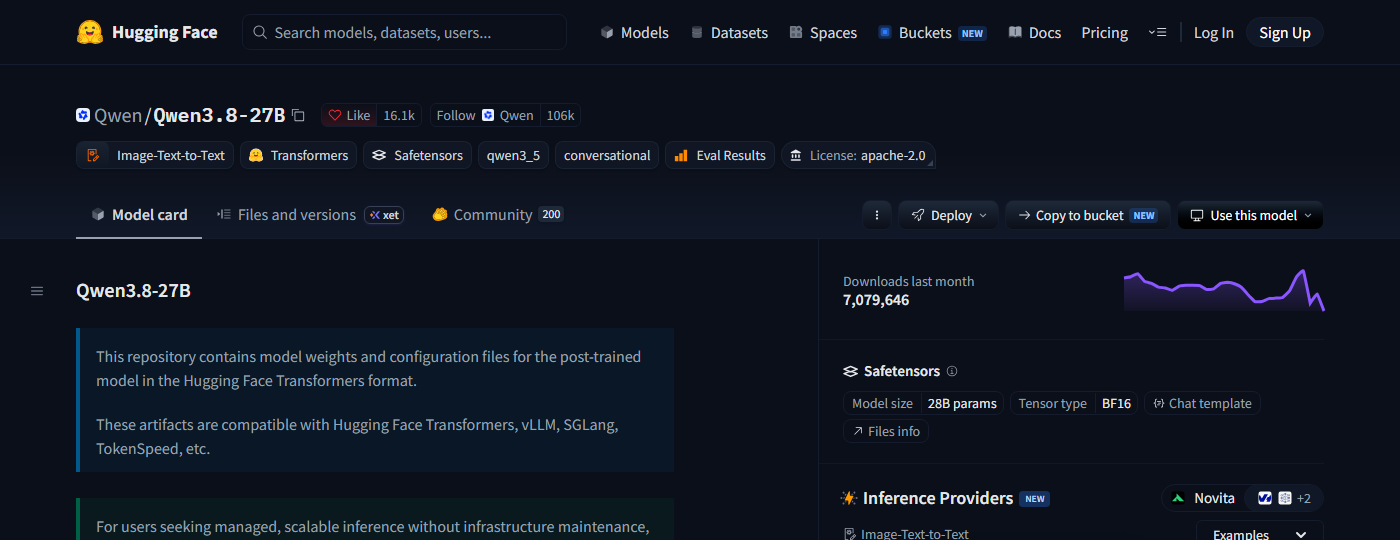
huggingface.co/Qwen/Qwen3.8-27B, captured on the day this guide was checked. Cards change; this one is a snapshot.
The outlined fields, in the order to read them:
- 1the licence fieldLicense: apache-2.0
- 2whether it is gatedno gating notice on this card; the absence is the answer
- 3the library fieldTransformers, which tells you the runtime family
- 4the task tagImage-Text-to-Text
- 5the parameter countModel size · 28B params
- 6the context lengthfurther down the card
- 7the benchmark tablefurther down the card, and the last thing to trust, not the first
The families, second column
The families from the Origin tier's map, one row each, with what the folder holds and what opens it. Cells this tier has verified are filled; the rest are filled at Nexus.
| Family | What is in the folder | What opens it |
|---|---|---|
| Language models | safetensors (maker), GGUF (quantised), MLX (Apple) | Ollama, LM Studio, llama.cpp, vLLM |
| Image generation | safetensors for the diffusers library |
filled at Nexus |
| Video generation | safetensors, the maker's own library (Wan 2.2 lists wan2.2) |
filled at Nexus |
| Speech, vision, embeddings, classical | filled at Nexus | filled at Nexus |
2.15The question Vector leaves you with
You can read the filename, the folder and the card. What you cannot yet do is choose: which family, which model, which quant, and what it will need. That is the Nexus tier, family by family.